EBusiness Reviews may earn a commission when you buy through links on this page, at no extra cost to you. This does not affect our ratings.
Small businesses that want to keep prospects organized without drowning in administration often look for a tool that makes the capsule crm sales pipeline easy to follow. Our team at EBusiness Reviews set out to examine how this platform supports everyday deal tracking, where it shines, and which operational limits deserve attention before you commit.
Picking customer relationship software means understanding how stage movement, activity logs and contact details work together during routine selling. Teams leaving spreadsheets tend to value clear visuals and a gentle learning curve more than heavy customization. Looking at how this platform fits your sales habits helps you avoid adding friction to a process that already works.
Quick verdict: With an overall EBusiness Reviews score of 7.5/10, the platform suits small teams and solo sellers who want defined opportunity stages and reliable relationship history without lengthy setup. It is less suited to large enterprises that need highly tailored approval chains or automated routing across departments.
| Metric | Summary Details |
|---|---|
| EBusiness Reviews score | 7.5/10 |
| Best for | Small service firms and independent teams handling direct relationship sales |
| Not ideal for | Organizations needing layered approval chains or complex enterprise territory rules |
| Key strengths | Clear pipeline stages, relationship history and minimal configuration |
| What to check before buying | Confirm user seats, add-on costs and reporting limits on the official vendor website |
1. How EBusiness Reviews Evaluated Capsule CRM
This assessment covers what Capsule CRM is designed to do, who it serves and how it compares with similar tools. We applied seven EBusiness Reviews criteria: features, ease of use, pricing and value, integrations, audience fit, support and competitive position. Plans and prices change frequently, so we flag the details you should verify on the official website before purchasing. This article was researched and drafted with AI assistance, then reviewed and edited by the EBusiness Reviews Editorial Team.
2. What Capsule CRM Does and Who It Serves
Capsule CRM is a contact and deal management system that brings prospects, customer conversations and project milestones into one workspace. It ties communications, scheduled tasks and monetary opportunities to company profiles, keeping the focus on who you spoke with, what was agreed and what comes next, rather than on heavyweight enterprise frameworks.
The software is most useful for solo consultants, professional service agencies, boutique firms and growing teams that want orderly sales records. These users often struggle when deals live in disconnected spreadsheets or in platforms that demand weeks of administration. In the broader Collaboration & Productivity category, simplicity and consistent daily use frequently beat sprawling feature lists that nobody opens.
Organizations with many departments, complex distributor networks or long hierarchical review cycles may find a simpler pipeline too limiting. For businesses built on direct, high-trust client relationships, a tidy deal board keeps daily work aligned. Reviewing how your team currently logs inquiries will show whether a straightforward relationship tracker meets your goals.
3. Core Features of the Capsule CRM Sales Pipeline
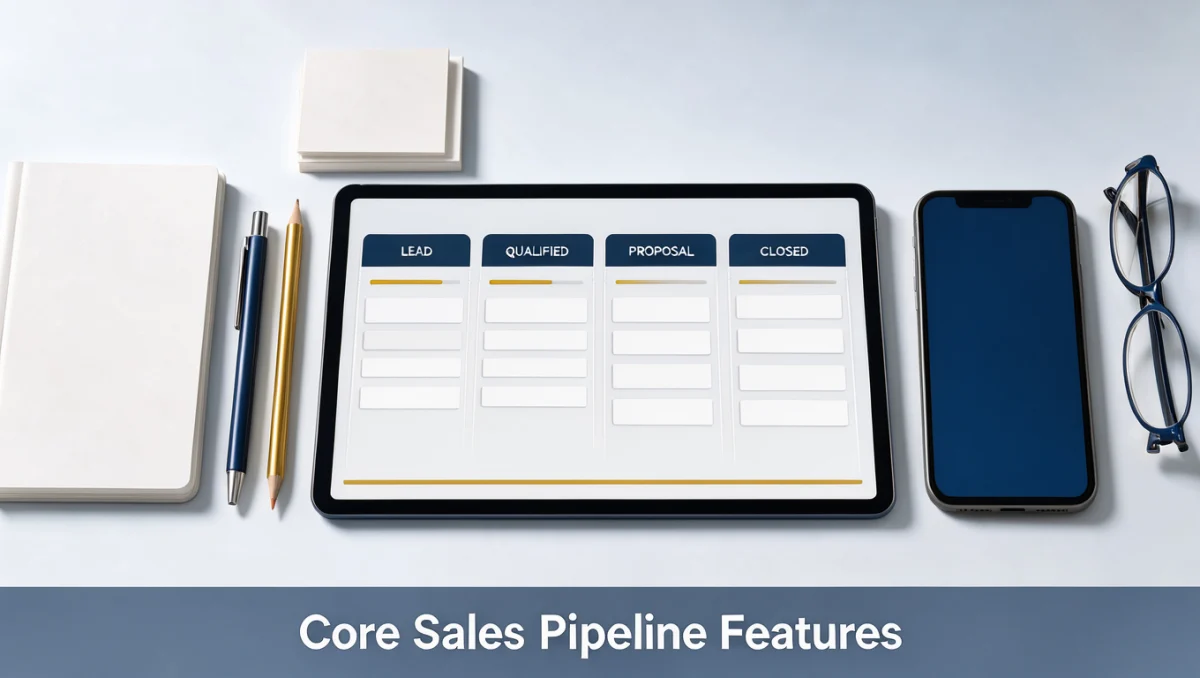
Understanding how the sales tracking mechanism is built helps you judge whether daily selling activity will flow smoothly.
3.1. Visual Deal Tracking and Stage Milestones
Deals move through linear stages from first contact to closing. You can define steps that reflect real sales milestones, such as discovery, quotation, proposal review and final agreement. Moving an opportunity along the board updates revenue projections and shows reps which accounts need immediate follow-up.
3.2. Contact and Organization History Management
Contact records keep a chronological log of notes, scheduled activities, sent emails and linked opportunities. When several team members engage the same prospect, the shared timeline preserves context and prevents duplicated outreach or forgotten commitments. Background details attached to each pipeline entry reduce confusion during critical negotiations.
3.3. Task Scheduling and Follow-Up Workflows
Team members can attach to-do items directly to leads and stages. Reps can set reminder dates for calls, contract revisions or check-ins so momentum does not stall. Linking daily task checklists to active opportunities means less time spent deciding what to prioritize each morning.
3.4. Basic Sales Forecasting and Reporting
Reporting tools summarize open opportunities, expected closing dates and historical win rates across standard periods. Visual summaries reveal overall pipeline health and highlight bottlenecks where deals linger. Advanced statistical modeling requires dedicated analytics tools, but standard milestone reports cover the routine visibility that growing small businesses need.
4. Ease of Use and Daily Deal Management
Adoption often decides whether a new customer management tool succeeds. A system that demands hours of manual field setup or constant maintenance tends to leave records abandoned and pipeline figures outdated.
The learning curve is manageable because navigation centers on standard contact directories, task lists and opportunity stages. New staff can usually start logging calls, attaching documents and updating deal statuses after a short orientation. The clean layout avoids deeply nested administrative menus, so reps can update records between meetings without friction.
Simplicity does involve tradeoffs. Teams that need automated branching logic, custom script triggers or elaborate conditional fields will find that straightforward design takes precedence over deep technical tailoring. Confirming your daily administrative requirements will show whether easy usability outweighs advanced structural flexibility.
5. Evaluating the Capsule CRM Sales Pipeline: Pros and Cons
Weighing functional strengths against structural limits gives a balanced view before you commit your sales workflow to any vendor.
5.1. Operational Strengths
- Clear pipeline visibility that lets reps see deal stages, expected values and required follow-ups at a glance.
- A contact-centric structure that organizes meeting logs, associated team members and open deals within unified records.
- Low configuration overhead, so small operations can start tracking prospective revenue without hiring external consultants.
- Simple task linking that connects to-do lists directly to active deals, reducing the chance of abandoned prospects.
5.2. Functional Considerations and Tradeoffs
- Limited support for multi-layered deal approvals, which can challenge teams that require formal sign-offs at each stage.
- Reporting emphasizes straightforward pipeline summaries rather than deep multi-touch marketing attribution or complex statistical modeling.
- Customization focuses on standard fields and tags rather than extensive structural reconfiguration or dynamic page layouts.
6. Capsule CRM vs Similar Pipeline Tools
Comparing customer relationship platforms reveals different philosophies about software depth and administrative balance.
| Platform | Target Audience Positioning | Core Operational Strengths | Key Consideration Before Selection |
|---|---|---|---|
| Capsule CRM | Small service businesses and lean teams | Clean deal tracking and intuitive contact histories | Verify whether your reporting needs go beyond standard summaries |
| Pipedrive | Sales-heavy teams driven by activity targets | Structured sales cadences and activity-focused pipeline design | Assess whether your focus is pure sales outreach or broader relationships |
| HubSpot CRM | Organizations prioritizing unified inbound marketing | Broad ecosystem linking marketing lead capture and CRM records | Examine plan tiers and potential cost growth as contacts scale |
| Zoho CRM | Businesses requiring broad administrative customization | Extensive functional modules and wide configurability | Evaluate whether team size justifies a longer onboarding period |
Pipedrive focuses on activity-driven sales cadences, which suits outbound teams managing high call volumes. Capsule CRM takes a broader relationship view, balancing pipeline stages with detailed interaction records that fit consultancies and professional agencies.
HubSpot CRM is built around inbound marketing, connecting website forms, content assets and nurturing campaigns to sales records. It offers substantial marketing breadth, but small teams that only want simple deal tracking often find a standalone pipeline tool easier to manage.
Zoho CRM offers extensive customization, programming options and operational depth suited to expanding companies. That flexibility requires significant configuration time and ongoing upkeep, so small organizations without dedicated IT staff often prefer streamlined platforms that are ready for daily use right after sign-up.
7. Who Should Rely on Capsule CRM

Checking whether your operational needs match the platform's strengths helps you avoid a mismatched purchase.
7.1. Freelancers and Solo Consultants
Solo professionals handling a moderate number of high-value advisory or project contracts benefit from one place to store client context. Tracking proposal deadlines, conversation history and billing milestones keeps commitments from slipping. The uncluttered interface lets independent operators record notes quickly without pulling attention from client delivery.
7.2. Small Service Agencies and Consultancies
Boutique marketing firms, design agencies, accounting practices and legal advisors often share client histories across small account teams. When a colleague takes over a client meeting, the full pipeline stage and past correspondence are available, ensuring continuity. The platform offers enough oversight without burdening creative or service staff with complex data entry.
7.3. Startup Teams and Growing Commercial Operations
Early-stage companies organizing investor conversations, initial enterprise pilots or partner discussions find structured deal boards practical. Standard stages make it easier for founders to present traction clearly in internal reviews, and as new sales staff join, the existing pipeline becomes an accessible baseline.
7.4. Teams That May Need Alternative Solutions
High-volume e-commerce brands, large enterprise sales organizations with regional distributor networks and companies that need deeply automated call center scripting will likely outgrow a basic pipeline board. If your operations depend on automated commission tracking, detailed territory quotas or complex compliance workflows, it is worth looking at enterprise-grade platforms.
8. How to Choose the Right Plan for Deal Tracking
Subscription tiers for relationship software vary widely. Knowing which details to verify on the vendor site helps you pick a package that can accommodate future growth.
| What to Check on Official Site | Why It Matters to Your Budget | Action Required by Your Team |
|---|---|---|
| User seat allocations and minimums | Per-seat pricing scales with headcount and affects annual commitments | Count everyone who needs deal visibility and calculate total subscription cost |
| Record volume and contact limits | Caps on active contacts or open deals can force unplanned tier upgrades | Audit your current contact database and forecast annual lead intake |
| Workflow automation availability | Automated reminders or stage triggers may only be included in higher tiers | Identify which manual pipeline steps you expect the software to handle automatically |
| Reporting depth and history windows | Extended analytics and custom dashboard exports are often tiered by plan | Determine whether executive reporting requires customized milestone metrics |
| Third-party integration connectivity | Connecting email or accounting software may require a specific package tier | Confirm compatibility with your current productivity tools before purchase |
9. Frequently Asked Questions
How should a team prepare its contact data before moving into a pipeline tool?
Clean existing contact records by removing duplicates, standardizing company names and archiving inactive leads before migrating. Mapping spreadsheet columns to matching CRM fields ensures that customer histories, phone numbers and past deal values populate correctly in the new stages.
What extra costs should buyers plan for alongside a CRM subscription?
Budget for possible third-party integration connectors, premium email sync tools, internal training hours and data backup solutions. Subscription fees cover core access, but add-ons and setup time are real investments during rollout.
How can small businesses ensure sales staff keep deal stages up to date?
Adoption improves when managers keep pipeline stages simple, limit mandatory custom fields to essential data and tie weekly sales check-ins to the deal board. When reps see that current records reduce repetitive status meetings, updating the pipeline becomes part of normal work.
When should an organization move from a basic pipeline to an enterprise platform?
The move becomes necessary when you add complex regional territories, multi-tier approval chains, multi-currency revenue sharing or automated call center queues. If workarounds start consuming excessive selling time, evaluating an enterprise platform provides the architectural scalability you need.
10. Final Verdict on Capsule CRM
Choosing the right customer management platform means balancing feature depth against daily operational friction. The capsule crm sales pipeline offers dependable value for teams that prioritize visual simplicity, solid contact records and quick onboarding over elaborate customization.
| Evaluation Criterion | Score /10 | Reasoning Based on Operational Capabilities |
|---|---|---|
| Features | 7.0/10 | Provides dependable core stage tracking and contact histories, though deep enterprise workflows fall outside its focus. |
| Ease of Use | 8.5/10 | Minimal configuration and a clean layout allow rapid onboarding with little staff training. |
| Pricing and Value | 7.5/10 | Subscription tiers offer predictable budgeting, though teams should verify user add-ons and contact limits. |
| Integrations | 7.0/10 | Connects with routine workplace productivity tools, but buyers should confirm specific sync support on the vendor site. |
| Audience Fit | 8.0/10 | Especially well suited to consultancies, small service firms and independent teams managing direct relationship sales. |
| Support | 7.0/10 | Assistance channels provide standard operational guidance, though organizations should check current coverage hours independently. |
| Competitive Position | 7.5/10 | Holds a distinct position as a clean, low-maintenance option against heavier, more complex competitors. |
Overall EBusiness Reviews Score: 7.5/10
If your team needs straightforward stage tracking without lengthy onboarding, this software provides a dependable foundation. For questions about CRM selection or to suggest tools for our editorial team to analyze, reach out through the EBusiness Reviews contact page or connect with our analysts on the EBusiness Reviews LinkedIn organization page.